Bringing PayPal to Paystack checkout, from merchant onboarding to refunds

Company

Paystack
In partnership with PayPal

Role

Product designer
UX researcher

Users

Merchants
Customers
Operations & support teams

Status

Designed and tested
Launch paused on partner dependencies

FintechPaymentsPartnerships

The goal

Let merchants accept PayPal on Paystack, without losing the trust of their customers.

PayPal wanted to reach more African merchants, and chose to do it by partnering with Paystack rather than building its own presence market by market. Together, we set out to offer PayPal as a payment option on Paystack checkout. I designed the end-to-end experience: how a merchant enables PayPal and gets verified, how a customer pays with it, and how merchants handle PayPal chargebacks from their Paystack dashboard.
Objective 01

Make merchant onboarding intuitive, even though it spans two companies’ systems.

Objective 02

Keep customers’ trust at checkout, especially when they’re sent to PayPal to sign in.

Why PayPal

What it offers merchants and their customers

Better success rates

Funds come from PayPal rather than the issuing bank, so fewer payments are blocked.

More ways to pay

Customers can pay by card or with their PayPal balance.

Trust and protection

A recognised brand, with buyer protection for customers and chargeback support for businesses.


01 · Merchant onboarding

Enabling PayPal, across two ecosystems

Educate first

Answer merchants’ questions before they ask them

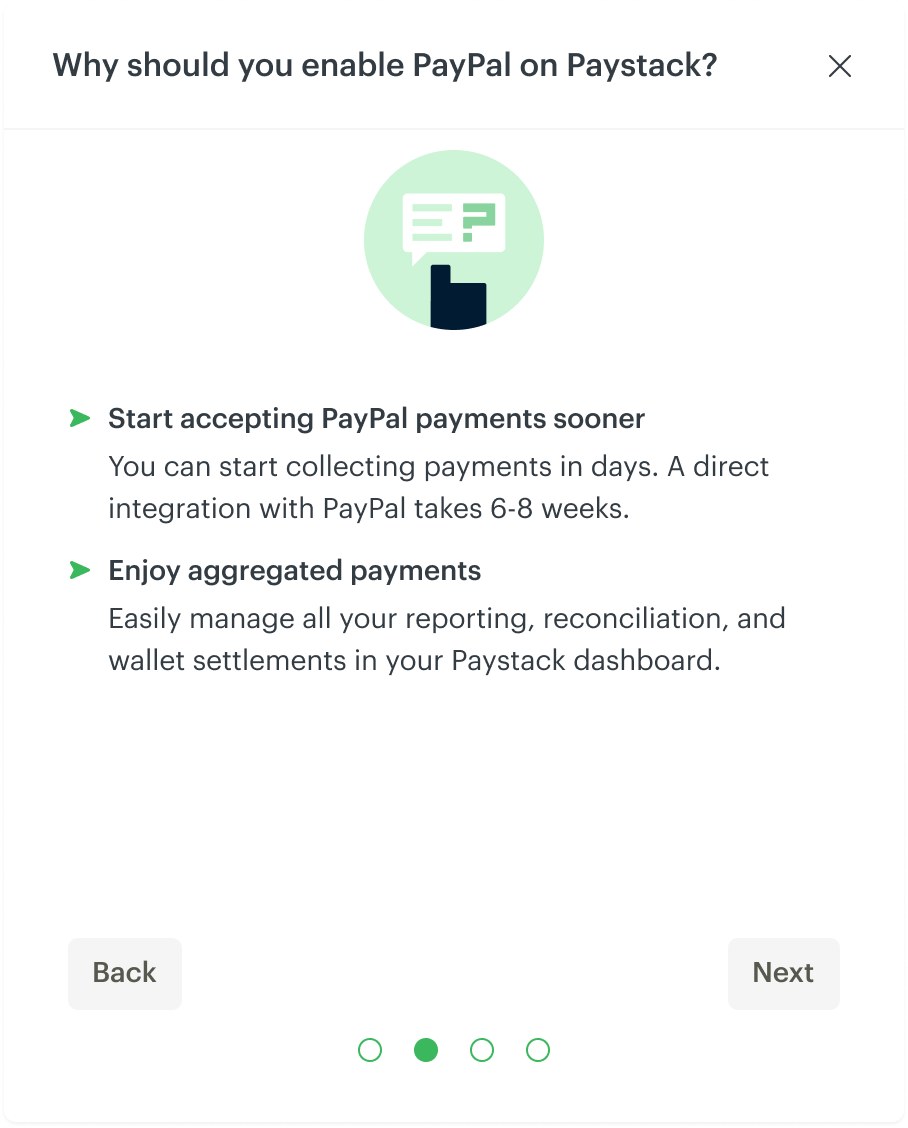
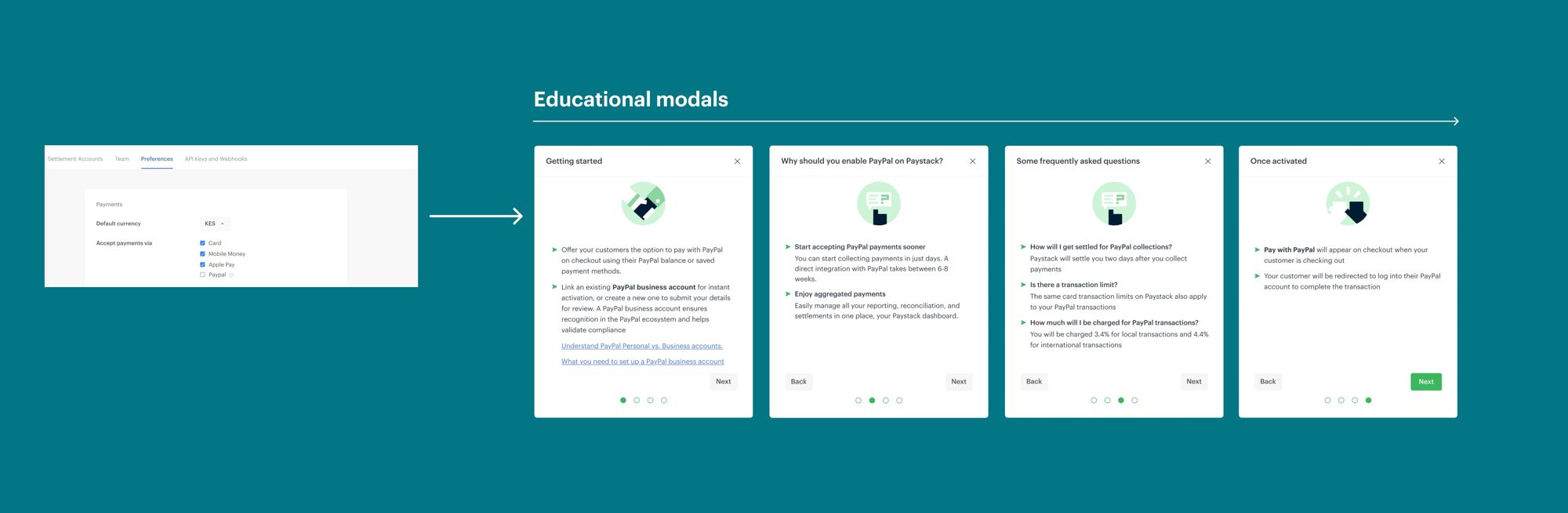
When a merchant turns on PayPal for the first time, a short series of modals explains what it is, why it’s worth enabling, and what happens next. The content came from the questions merchants raised when we tested early prototypes with them.

Payment preferences with PayPal unticked, leading to four educational modals: Getting started, Why enable PayPal, Frequently asked questions, and Once activated
Ticking PayPal in payment preferences opens four short educational modals.

Business account and verification

Make the hand-off to PayPal, and the wait, feel clear

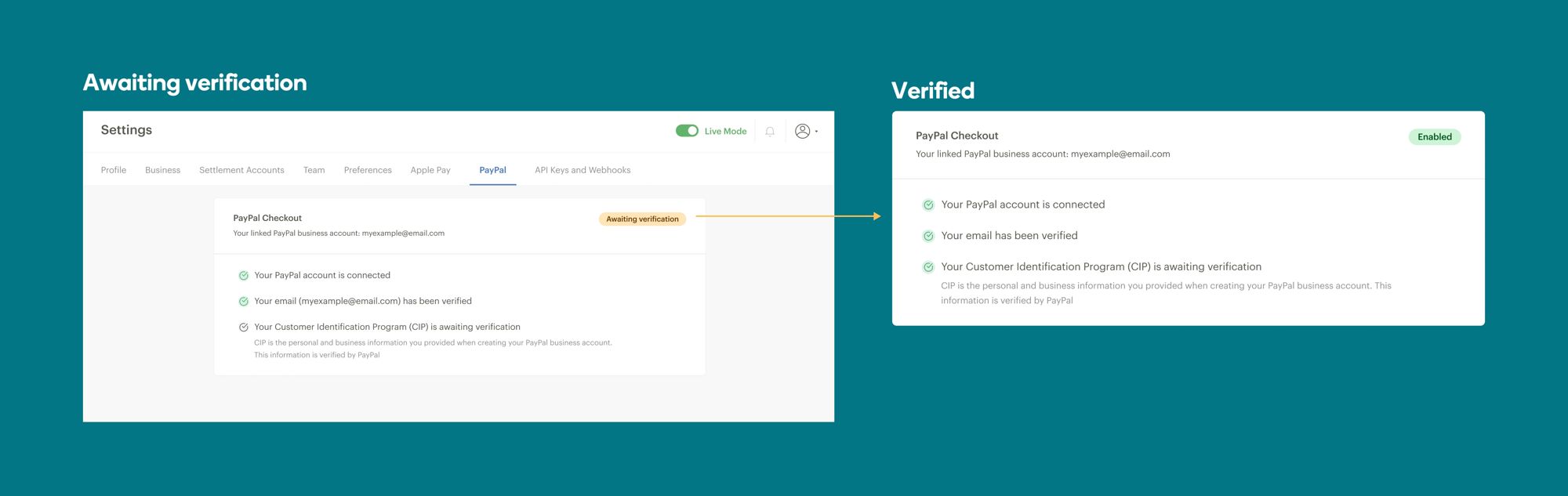
Merchants need a PayPal business account. They can link one, create one, or upgrade a personal account, and they finish that on PayPal, including KYC, because Paystack doesn’t pass merchant details across. Back on Paystack, the dashboard shows exactly where verification stands. Through the partnership, verification takes days rather than the usual six to eight weeks.

PayPal Checkout settings card moving from Awaiting verification, with a checklist of connection, email and identity steps, to Enabled
A checklist shows each step, from awaiting verification to enabled.

Customer checkout

A familiar PayPal sign-in, framed by Paystack

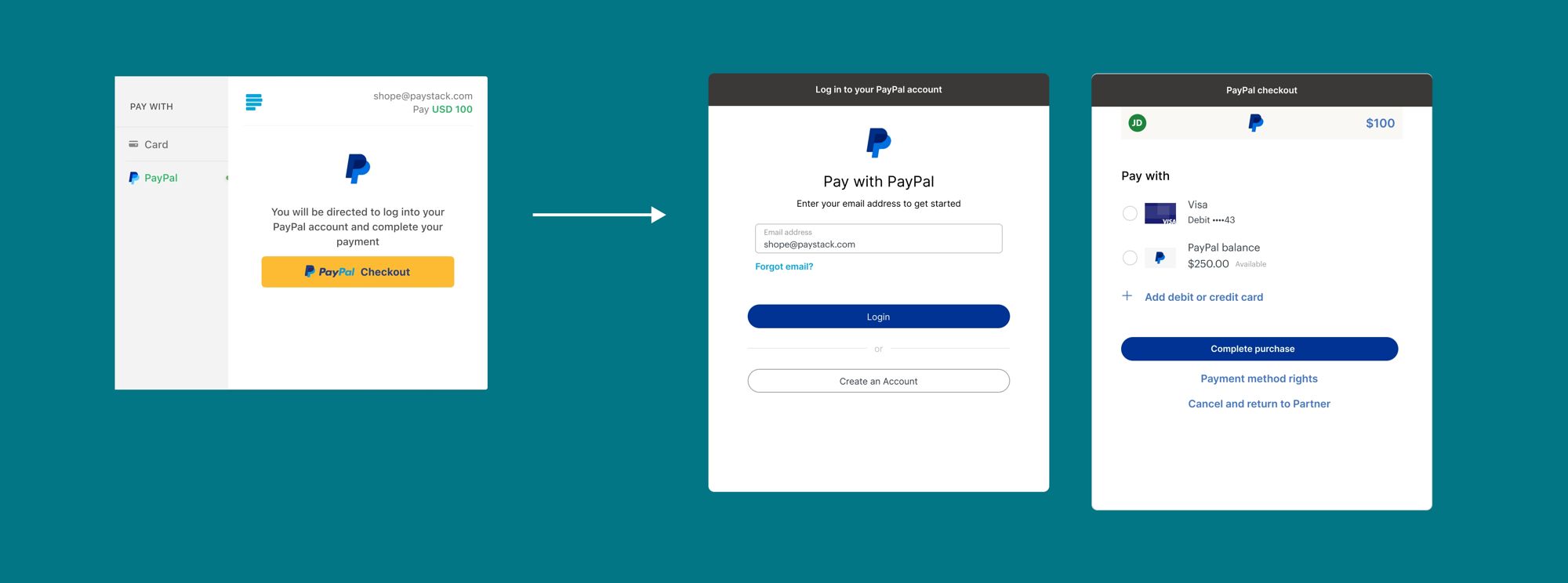
Once PayPal is enabled, customers choose it on checkout and sign in to their PayPal account to pay.

Paystack checkout with Pay with PayPal selected, the PayPal sign-in window, and PayPal’s payment confirmation
Choosing PayPal, signing in, and confirming the payment.

Every hand-off between Paystack and PayPal should feel expected, never surprising.

The principle

02 · Refunds and chargebacks

PayPal disputes, handled on the Paystack dashboard

The constraint

PayPal sets the rules, so the design had to guide merchants through them

PayPal disputes work differently from other disputes on Paystack, and there was little room to change the process. The goal was to help merchants succeed within it, through clear actions, rules and education.

Accept

Issue a full refund to the customer.

Make an offer

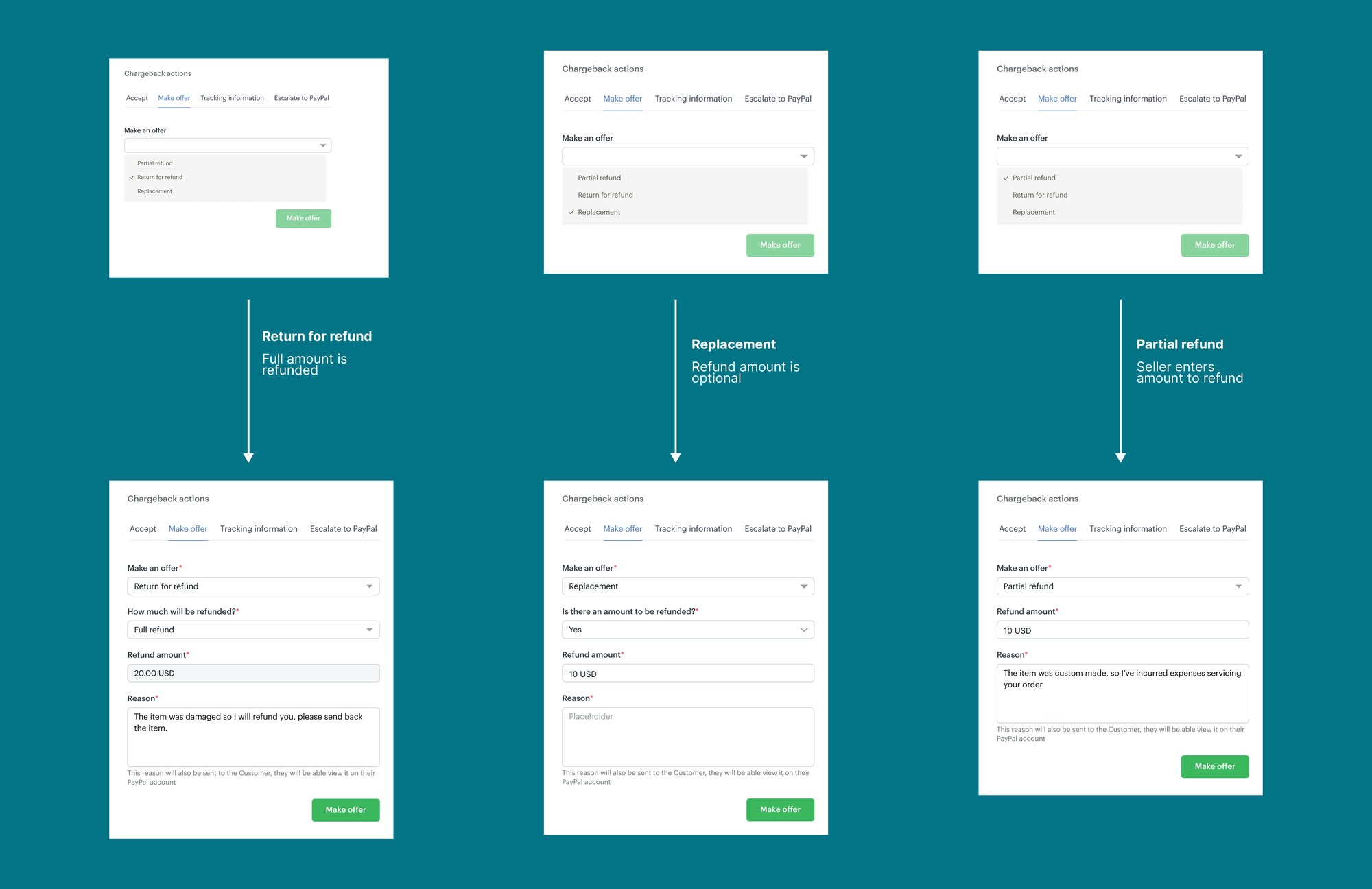
A partial refund, a return for refund, or a replacement, each with an amount and a reason.

Add tracking

Allowed once, and only before any other action is taken.

Escalate to PayPal

Hands the case to PayPal. Every other action, including chat, is then closed.

Chargeback actions panel: choosing Return for refund refunds the full amount, Replacement makes a refund optional, and Partial refund lets the seller enter the amount, each followed by its own form and a reason sent to the customer
Each offer type asks only for what it needs.

Visibility for the team

Merchants and customers talk directly. Ops can see it all.

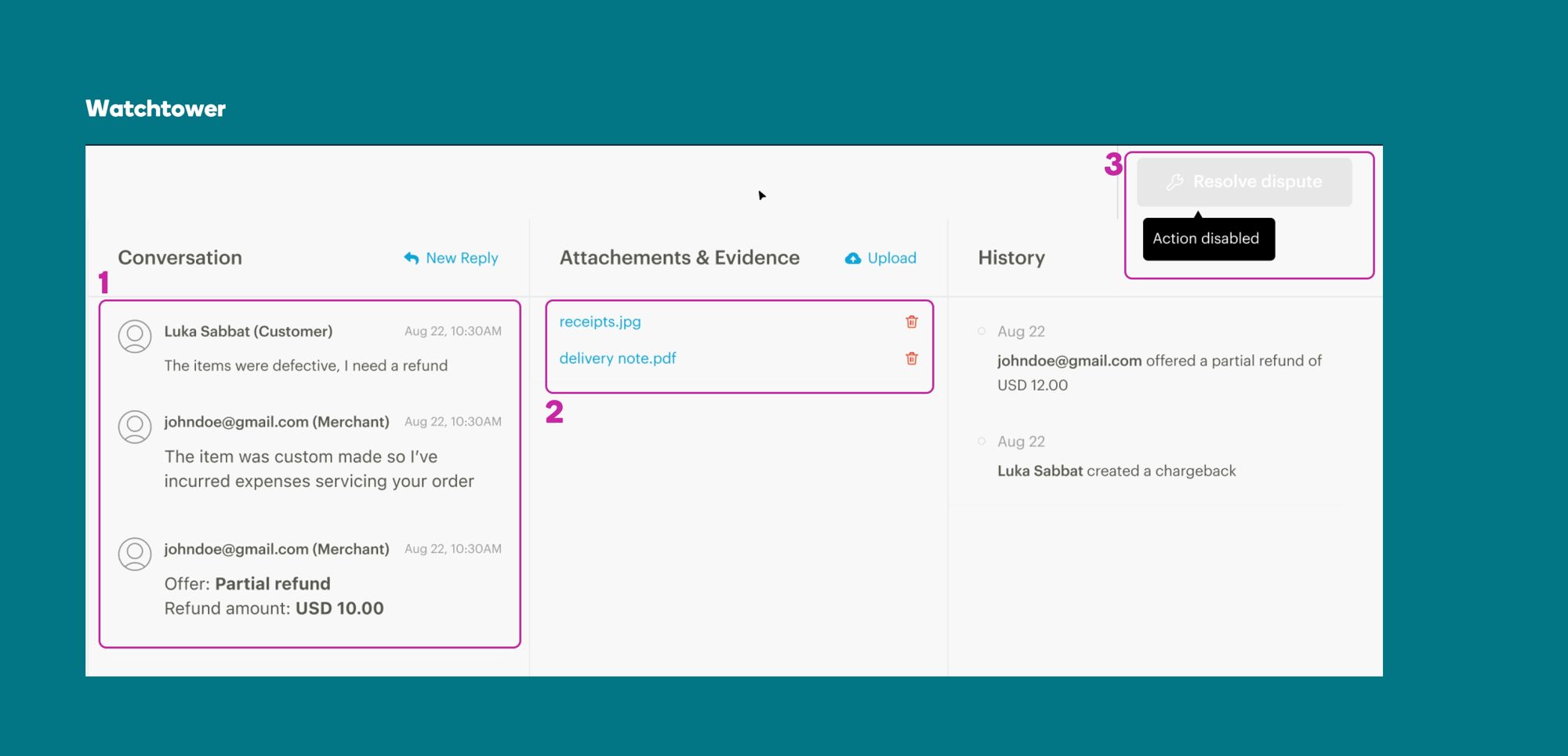
For PayPal disputes, merchants can chat with customers. The conversation, shared documents and history are logged on Watchtower for the operations team, with the resolve action turned off, since PayPal owns the outcome. Emails keep merchants and the support team in the loop when a dispute is raised or escalated.

Watchtower dispute view with the conversation, attachments and history, and the resolve dispute button disabled

03 · Testing

Testing prototypes with merchants

Usability sessions

Two tasks, talked through out loud

Merchants worked through clickable prototypes while thinking aloud, and we followed up on the moments most likely to cause doubt. We ran a separate round on the disputes flow to find where merchants might get stuck before launch.

Task 1 · Enable PayPal

  • Do the educational modals answer the right questions?
  • Does the hand-off to PayPal make sense?
  • Is the verification checklist clear, and what else is expected there?

Task 2 · Pay with PayPal

  • Do customers trust being sent to PayPal to sign in?
  • Does anything unexpected happen between screens?

04 · Status

Ready to launch, once the partnership is

Where it stands

The designs are complete and tested with merchants. Launch is on hold while a few dependencies on the PayPal partnership are worked through. The experience will go live as soon as they’re resolved.


Next project

Using design to rethink how girls are taught Menstrual Hygiene Management across Kenya

Read next case study